Advanced Search
Previous Topic  Next Topic 


Why Use Advanced Search?


Words typed in the Search field are matched, by deafult, against the record titles only. This is very good for quickly retrieving records you have bookmarked where you know what words to search on and the set of results will be small. However these simple searches don't give you the power to discriminate and filter out specific sets of records from the much larger set of records in the complete Heurist database.


Heurist's Advanced Search allows you to carry out highly targeted searches using conventions very similar to - but far more powerful than - other search engines.


How to Use Advanced Search


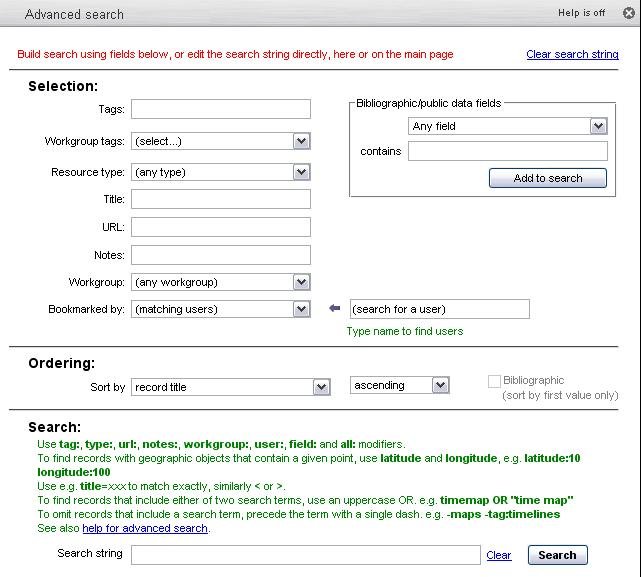
  1. Click on the Advanced search link. The Advanced Search popup constructs search instructions to select the pulldown values or type search terms in the fields. It displays the search instructions in the Search field at the bottom of the popup.


  1. Type or edit these instructions directly in the Search field on the popup or the Quick Search field on the main page.  All Search fields are functionally equivalent. 


Advanced Search allows more precisely targeted searches, searching across a wider range of data, and sorting of results:


  • restriction of searches to specific record types (eg. journals, research projects, historical events, course units)
  • restriction of searches to specific fields (eg. keywords, creator, owner or web address)
  • requiring the presence of several terms together (a AND b)
  • requiring the presence of any of several terms (a OR b)
  • exclusion of records in which a particular term occurs
  • sorting to create an alphabetised list or a list with the most relevant entries at the top
  • combinations of all of the above


See Also:


Saved Searches

Quick Searches

Live Bookmarks

General Principles

Search Examples

Special Data Fields

Public Data Fields

Geographic Fields

Sorting

Advanced Functions