|
Domain Profiles
|
  |
|
Domain Profiles
|
|
|
Help us build a profile for your domain! We invite assistance from graduate students and domain specialists. It should take no more than a couple of days - you may already have most of the resources. Please email Ian Johnson (yd.edu.au">yd.edu.au) |
We are in the process (Jan 2009) of setting up a number of domain profiles which encapsulate a set of useful resources for a particular subject area. These resources include:
Useful websites such as major institutions, databases and repositories, bibliographies, preprint servers, sources of tools and technical information, major annual conferences etc.
Major journals and a selection of key generic literature for the domain, broad reference works such as encyclopaedias.
A small selection of generic tags which may be of use within the domain.
A small number of searches which will retrieve specific categoreis of information of relevance to the domain.
The domain profile function (accessible from the My Heurist page) allows any of these resources to be added to your personal space (MyHeurist). By default, the Generic Academic User profile is added to every new user's personal space as a 'starter set' to avoid the new user being faced with a completely blank canvas as in most social bookmarking databases.
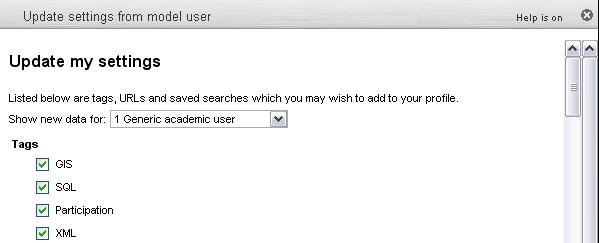
When you select a profile from the pulldown, the screen will show you all the resources from that profile which are not already bookmarked in your personal space (this allows you to revisit profiles and perhaps find new resources which have been added since).
Check the ones you want and click [Add Selected Items] button. You can repeat this step for several profiles.