|
Install Toolbar (Firefox Only)
|
  |
|
Install Toolbar (Firefox Only)
|
|
For Firefox users we have developed a standard Firefox toolbar which integrates several different Heurist functions in one convenient place.
Download the toolbar here (quick 2 click installation ...)
If you are not using Firefox, we strongly recommend installing Firefox [download]. This free browser is faster, more secure and more convenient then Internet Explorer. Firefox also has a wide range of extremely useful plugins (we particularly recommend the Zotero bibliographic tool developed by George Mason University, and the Heurist toolbar supports Zotero-to-Heurist data synchronisation).
⇒ 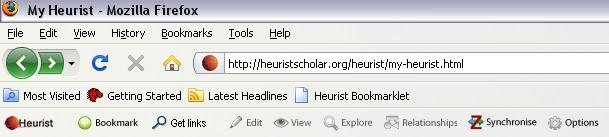
The toolbar appears in the toolbar area of the browser (if it is not visible, View > Toolbars > Heurist toolbar to see it).
The following functions are available:
|
|
Reload the Heurist home page (search for Favourites). User this as a shortcut to return to Heurist. |
|
|
Bookmark the current web page (greyed if already bookmarked) |
|
|
Edit the data for the current web page (greyed if not yet bookmarked) |
|
|
View the data in the database for the current web page (greyed if not yet bookmarked) |
|
|
Explore relationships of the current web page (greyed if not yet bookmarked) |
|
|
Set relationships for the current web page (greyed if not yet bookmarked) |
|
|
Synchronise your Zotero database with Heurist (copies updated versions of records, creates new recors in Heurist, as required) |
|
|
Set configuration of toolbar including the URLs accessed for the functions above |
Note: at the present time (Jan 2009) the Heurist toolbar is only visible if Zotero is loaded. This is a historical consequence, and will be corrected shortly.
Use
Before clicking on the Bookmark or Edit functions, highlight a section of text such as a bibliographic reference, an abstract or the key descriptive section of the web page you are bookmarking. This highlighted text will be copied to the record created and stored in two places:
The WYSIWYG text section of the record
The scratchpad
The text is also analysed to attempt to extract any significant bibliographic information such as the ISBN, ISSN or DOI. We are currently (Jan 2009) working on algorithms to identify and extract less structured bibliographic information such as author names, dates, titles, journal names and so forth.
The scratchpad is a useful floating text box from which data can be dragged into data entry fields to save retyping.


