|
Install Bookmarklet |
|


The operates from the browser toolbar to capture the web page displayed in the browser and analyses it for bibliographic information. The bookmarklet also provides a range of other functions, such as importing links from a web page or search list.
Note: Firefox users can get all the same functions (and more) from the Heurist toolbar, but may still find the bookmarklet useful.
The bookmarklet is a simple Javascript component like those found (and executed automatically) on most web pages. It is easily installed and will not harm your computer. Use with confidence.
Installation
Drag the Heurist Bookmarklet to the Bookmarks or Links toolbar in the browser:

If dragging the link doesn't work: right click on the link and select - Add to Favorites - and select the - Links - toolbar.
Note: the link can be renamed after it is added to the toolbar by right clicking and selecting - Properties
Use
The bookmarklet appears as a link on the bookmarks toolbar:
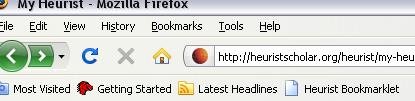
Before clicking on the bookmarklet link, highlight a section of text such as a bibliographic reference, an abstract or the key descriptive section of the web page you are bookmarking. This highlighted text will be copied to the record created and stored in two places:
The WYSIWYG text section of the record
The scratchpad
The text is also analysed to attempt to extract any significant bibliographic information such as the ISBN, ISSN or DOI. We are currently (Jan 2009) working on algorithms to identify and extract less structured bibliographic information such as author names, dates, titles, journal names and so forth.
The scratchpad is a useful floating text box from which data can be dragged into data entry fields to save retyping.