|
My Heurist Page
|
  |
|
My Heurist Page
|
|
|
The My Heurist page provides access to all the functions of Heurist which are not exposed directly on the Heurist Homepage. My Heurist is accessed via a link at top right of the Heurist Homepage. |
|
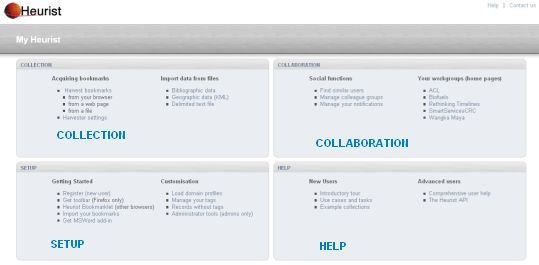
The My Heurist page is divided into four areas: Collection - Collaboration - Setup - Help
|
Collection This is where the Heurist user can acquire bookmarks and import data, e.g. bibliographic or geo-spatial records, to build their collection(s) of resources. |
Collaboration This is where the Heurist user can use and manage their notifications and Workgroups and share their own or find similar users and work collaboratively. |
|
Setup This is where Heurist users gets themselves setup, by installing the toolbar and customises Heurist functions to work to suit them, e.g. manage your own tags. |
Help This is where new and advanced Heurist users can go to learn more about Heurist, by retaking a tour, using the comprehensive online help or looking at how to build a link to a map online. |
|
Thank you for trying Fast-Help www.Fast-Help.com This notice only appears in the Trial version. |