|
Record Ownership
|
  |
|
Record Ownership
|
|
Public Ownership
By default, all records are public ownership, in the spirit of collaborative databases, and all public information can be edited by any Heurist user.
Workgroup Ownership
However specific records can be owned by a workgroup, in which case the public information may only be edited by members of that workgroup. In addition, records may be marked as hidden, in which case they are only visible to members of the workgroup.
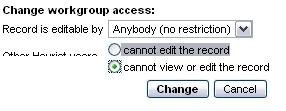
Change Workgroup Ownership
*The values in the drop-down menu are: Anybody (no restriction) and any of the Workgroups the user is a member of.
**Other Heurist users can be limited to: not being able to view the record and/or edit the record
Setting Ownership on Creation
When adding a new record through the Add Record dialogue, ownership and visibility can be set to a specific workgroup.
Changing Ownership of Existing Records
This function is only available to Administrators, to avoid individual users making records inaccessible to other users.
Bulk Change
Ownership of multiple records can be changed by retrieving a set of records through a search and then setting the ownership and visibility through the Owner link above the results.
Individual Record
To change ownership of an individual record, select the workgroup from the pulldown at the top of the edit form.

If you want the record to also be hidden to anyone who is not a member of the workgroup, check the visibility checkbox:
Note:
Ownership and visibility should ONLY be restricted for records which are private to a workgroup.
Records can only be owned by a single workgroup. Once a record is marked as owned by a workgroup, only members of that workgroup can change its ownership and visibility.
The discussion section of a visible record is not governed by record ownership, since indivual users own their own comments. So anyone can add comments. However, if the record is hidden non-members of the workgroup will not have access to the discussion section.
The WYSIWYG text section of a visible record is not governed by record ownership, since indivual users can add text blocks which they own. However, if the record is hidden non-members of the workgroup will not have access to the text section.